Default Router Passwords
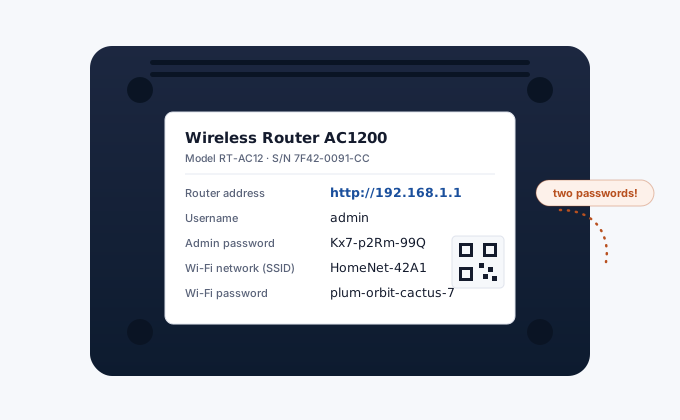
Factory login credentials for 100+ router brands. The sticker on your router is always the most accurate source - use this table when the label is unreadable or if you need to confirm what defaults to expect.
Default credentials by brand and model
| Brand / Model | Default IP | Username | Password | Guide |
|---|---|---|---|---|
Netgear (all models) | 192.168.1.1 | admin | password | Guide |
Netgear Orbi | 192.168.1.1 / orbilogin.com | admin | password | Guide |
TP-Link (older firmware) | 192.168.1.1 | admin | admin | Guide |
TP-Link Archer (new) | 192.168.1.1 / tplinkwifi.net | admin | Set on first login | Guide |
TP-Link Deco | 192.168.68.1 | - | Set in Deco app | Guide |
Linksys | 192.168.1.1 / myrouter.local | admin | admin | Guide |
Linksys Velop | 192.168.1.1 | - | Linksys app | Guide |
D-Link (all models) | 192.168.0.1 | admin | blank (empty) | Guide |
Asus (all models) | 192.168.1.1 / router.asus.com | admin | admin | Guide |
Asus ZenWiFi | 192.168.1.1 | admin | admin | Guide |
Arris (Comcast gateway) | 10.0.0.1 | admin | password | Guide |
Arris SB8200 (modem) | 192.168.100.1 | - | No login (status only) | Guide |
Google Nest WiFi | 192.168.86.1 | - | Google Home app only | Guide |
MSI Router | 192.168.1.1 | admin | admin | Guide |
Starlink | 192.168.100.1 | - | Starlink app only | Guide |
Amazon Eero | 192.168.4.1 | - | Eero app only | Guide |
Apple AirPort Extreme | 10.0.1.1 | - | AirPort Utility app | Guide |
Apple AirPort Express | 10.0.1.1 | - | AirPort Utility app | Guide |
LPB Piso WiFi | 10.0.0.1 | admin | 123456789 | Guide |
Belkin (older) | 192.168.2.1 | admin | blank (empty) | Guide |
Belkin (newer) | 192.168.1.254 | admin | blank or see label | Guide |
BT Smart Hub 2 | 192.168.1.254 / bthub.home | admin | Unique - see base label | Guide |
BT Home Hub 5 | 192.168.1.254 | admin | Unique - see base label | Guide |
Thomson SpeedTouch | 192.168.1.254 | Administrator | blank (empty) | Guide |
Huawei HG8245H (ONT) | 192.168.1.1 | telecomadmin | admintelecom | - |
Huawei B315/B525 (LTE) | 192.168.8.1 | admin | admin | Guide |
Huawei HG532 (DSL) | 192.168.1.1 | admin | admin | Guide |
Huawei (FTTH models) | 192.168.3.1 | admin | admin | - |
ZTE (various) | 192.168.1.1 | admin | admin | - |
ZTE F660/F680 | 192.168.1.1 | admin | admin | - |
Xiaomi Mi Router | 192.168.31.1 / miwifi.com | admin | Set on first login | Guide |
Xiaomi AX series | 192.168.31.1 | admin | Set on first login | - |
Tenda (all models) | 192.168.0.1 / tendawifi.com | admin | blank (empty) | Guide |
AVM Fritz!Box | 192.168.178.1 / fritz.box | admin | Printed on device label | Guide |
AVM Fritz!Repeater | fritz.repeater | - | Printed on device | - |
Comcast/Xfinity XB6 | 10.0.0.1 | admin | password (needs app first) | Guide |
Comcast/Xfinity XB7 | 10.0.0.1 | admin | password (needs app first) | Guide |
Comcast/Xfinity XB8 | 10.0.0.1 | admin | password (needs app first) | Guide |
Verizon Fios G3100 | 192.168.1.1 | admin | password (see label) | - |
Verizon Fios G1100 | 192.168.1.1 | admin | password (see label) | - |
AT&T BGW210 | 192.168.1.254 | - | Device Access Code on label | - |
AT&T NVG589 | 192.168.1.254 | - | Device Access Code on label | - |
AT&T 2Wire 3801HGV | 192.168.1.254 | - | Device Access Code on label | Guide |
Spectrum SAC2V1K | 192.168.0.1 | admin | password | - |
Cox Panoramic | 192.168.0.1 | admin | password | - |
Frontier | 192.168.1.1 | admin | password | - |
CenturyLink (Zyxel) | 192.168.10.1 | admin | admin | Guide |
CenturyLink (Technicolor) | 192.168.0.1 | admin | admin | - |
Motorola MB8600 | 192.168.100.1 | - | Status page - no password | Guide |
Motorola MB8611 | 192.168.100.1 | - | Status page - no password | Guide |
Netgear CM1200 | 192.168.100.1 | admin | password | Guide |
Netgear CM2000 | 192.168.100.1 | admin | password | Guide |
Hitron CGNM-2250 | 192.168.0.1 | cusadmin | password | - |
Hitron CGN3 | 192.168.0.1 | cusadmin | password | - |
Ubee DVW3201B | 192.168.10.1 | admin | admin | Guide |
MikroTik (all) | 192.168.88.1 | admin | blank (empty) | Guide |
Ubiquiti UniFi | 192.168.1.1 | ubnt | ubnt | - |
Ubiquiti EdgeRouter | 192.168.1.1 | ubnt | ubnt | - |
Cisco RV series | 192.168.1.1 | cisco | cisco | - |
Cisco Linksys (ISR) | 192.168.1.1 | admin | admin | - |
SonicWall TZ series | 192.168.168.168 | admin | password | - |
Fortinet FortiGate | 192.168.1.99 | admin | blank (empty) | - |
Juniper SRX | 192.168.1.1 | root | blank (empty) | - |
DrayTek Vigor | 192.168.1.1 | admin | blank (empty) | - |
ZyXEL (home) | 192.168.1.1 | admin | 1234 | - |
ZyXEL (ISP models) | 192.168.1.1 | admin | admin or printed on label | - |
Adtran | 10.200.1.1 | admin | password | - |
3Com OfficeConnect | 192.168.1.1 | admin | admin | - |
Sagemcom (various) | 192.168.1.1 | admin | admin | - |
Technicolor (various) | 192.168.1.1 | admin | admin | - |
Nokia (Alcatel-Lucent) | 192.168.1.254 | admin | admin | - |
Comtrend | 192.168.1.1 | admin | admin | - |
Buffalo | 192.168.11.1 | admin | password | - |
Actiontec GT784WN | 192.168.1.1 | admin | password | - |
Netis | 192.168.1.1 | admin | admin | - |
TOTOLINK | 192.168.1.1 | admin | admin | - |
Mercusys | 192.168.1.1 | admin | admin | - |
Tenda N301 | 192.168.0.1 | admin | blank (empty) | - |
Billion | 192.168.1.254 | admin | admin | - |
EnGenius | 192.168.0.1 | admin | admin | - |
JioFi (India) | jiofi.local.html | administrator | administrator | - |
BSNL (India) | 192.168.1.1 | admin | admin | - |
Airtel (India) | 192.168.1.1 | admin | admin | - |
Globe At Home (PH) | 192.168.254.254 | user | user | - |
PLDT (Philippines) | 192.168.1.1 | admin | 1234qwer | - |
Globe B312 (PH) | 192.168.254.254 | admin | See router label | - |
STC (Saudi Arabia) | 192.168.1.1 | admin | admin | - |
Etisalat / e& (UAE) | 192.168.1.1 | admin | admin | - |
Ooredoo (Qatar/ME) | 192.168.1.1 | admin | admin | - |
Zain (KSA/Africa) | 192.168.8.1 | admin | admin | - |
MTN (Africa) | 192.168.8.1 | admin | admin | - |
IndiHome (Indonesia) | 192.168.1.1 | admin | admin | - |
TM Unifi (Malaysia) | 192.168.0.1 | admin | tm1234 | - |
Maxis (Malaysia) | 192.168.0.1 | admin | admin | - |
Singtel (Singapore) | 192.168.1.1 | admin | admin | - |
StarHub (Singapore) | 192.168.0.1 | admin | password | - |
Telstra (Australia) | 192.168.0.1 | admin | Telstra | - |
Optus (Australia) | 192.168.0.1 | admin | optus | - |
KPN (Netherlands) | 192.168.2.254 | admin | admin | - |
Swisscom Connect Box | 192.168.1.1 | admin | Printed on device | - |
Salt Fiber Box (CH) | 192.168.1.1 | admin | admin | - |
Sunrise Internet Box (CH) | 192.168.0.1 | admin | admin | - |
UPC Connect Box (AT/CH) | 192.168.0.1 | admin | admin | - |
A1 (Austria) | 192.168.0.1 | admin | admin | - |
Vodafone Station (IT/DE) | 192.168.1.1 / vodafone.station | admin | vodafone | - |
TIM (Italy) | 192.168.1.1 | admin | admin | - |
Fastweb (Italy) | 192.168.1.254 | admin | admin | - |
WINDTRE (Italy) | 192.168.1.1 | admin | admin | - |
Orange Livebox (France) | 192.168.1.1 | admin | admin | - |
SFR Box (France) | 192.168.0.1 | admin | admin | - |
Sky (UK) | 192.168.0.1 | admin | sky | - |
EE (UK) | 192.168.1.1 | admin | See router label | - |
TalkTalk (UK) | 192.168.1.1 | admin | admin | - |
Virgin Media (UK) | 192.168.0.1 | admin | changeme | - |
Plusnet (UK) | 192.168.1.1 | user | user | - |
Rogers Ignite Gateway | 192.168.0.1 | cusadmin | password | - |
Bell Home Hub 4000 | 192.168.2.1 | admin | admin | - |
Telus WiFi Hub | 192.168.1.1 | admin | telus | - |
Shaw BlueCurve | 10.0.0.1 | admin | admin | - |
No results for your search.
How to Change Your Router Admin Password
Log in to your router admin panel using the factory credentials from the table above. The admin password setting is usually in Administration, Management, or System settings. Choose a password of at least 12 characters that you store in a password manager. It should be different from your Wi-Fi password.
See the full guide: How to Change Your Router Admin Password.
Frequently Asked Questions
My router's default credentials are not in this table - where do I find them?
The most reliable source is always the label on the physical router - look on the back or bottom. It typically shows the default IP, username, and password. Manufacturer support pages and the router's quick-start guide are the next best sources. As a last resort, a factory reset returns the router to factory defaults including whatever credentials were originally printed on the label.
Does "blank password" mean I just press Enter?
Yes - when a router has a blank default password, you leave the password field empty and click Login. Do not type the word "blank." Some routers with blank passwords will prompt you to set a new one on first login.
Why does my ISP-supplied router have a unique password?
ISPs configure routers with unique per-device passwords as a security improvement over universal defaults. The unique password is printed on the router label and is typically a long random string. This is the correct password for that specific unit - it cannot be guessed from the brand name alone, which is the whole point.