How to Set Up a Wi-Fi Range Extender
A Wi-Fi extender rebroadcasts your existing network signal to areas of your home that the main router cannot reach. Setup takes about 5 minutes.
Placement Decides Everything
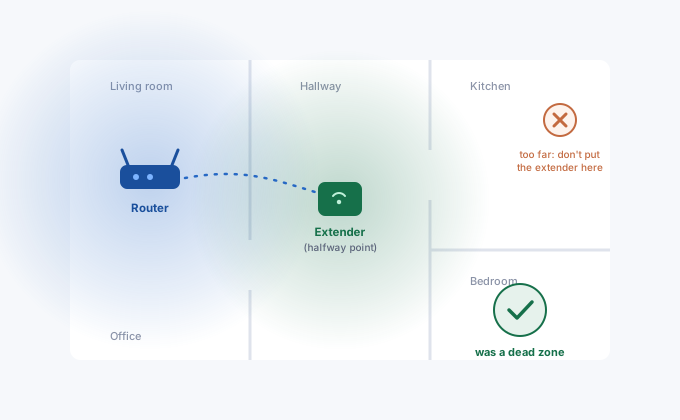
Here's the mistake almost everyone makes: plugging the extender into the dead zone itself. It feels logical, that's where you need the signal. But an extender can only rebroadcast what it receives. Put it where the router's signal is already garbage and it will faithfully rebroadcast garbage, just with full bars showing on your phone. Full bars, terrible internet.
The sweet spot is roughly halfway between the router and the problem area, somewhere the extender still pulls a strong, clean signal. Most extenders help you find it: TP-Link units have a signal LED that turns blue when the location is good and red when it's too far, Netgear calls theirs the Router Link LED. Trust the LED over your intuition.
A few placement details that genuinely matter: keep the extender out of the corner behind the TV (electronics create interference), off the floor if possible, and away from thick walls with plumbing in them. Wi-Fi hates water pipes more than almost anything else in a house.
The Fast Way: WPS Pairing
If your router has a WPS button (most do), setup takes two minutes and no passwords:
- 1Plug the extender in near the router
For pairing only, same room is fine. Wait for the power LED to go solid, usually under a minute.
- 2Press WPS on the router, then on the extender
You have about two minutes between the presses. The WPS LED will blink while pairing and go solid when done.
- 3Dual-band? Do it twice
On many extenders one WPS round pairs one band. If yours extends 2.4 GHz and 5 GHz separately, repeat the button dance to grab the second band. Check the manual, some newer models grab both at once.
- 4Move it to its real spot
Unplug, relocate to the halfway point, wait for it to reconnect. Settings survive the move.
WPS won't work if it's disabled on the router (some ISPs and security-minded folks turn it off) or if your network uses WPA3-only mode. In that case use the browser method below.
Setup via Browser
- 1Plug in the extender
Somewhere with good router signal. Wait for the power LED to be solid.
- 2Connect to the extender's setup network
On your phone or laptop, join the open Wi-Fi network the extender broadcasts out of the box, named something like TP-Link_Extender, NETGEAR_EXT or Linksys Extender Setup. No password at this stage.
- 3Open the setup address
tplinkrepeater.net(or 192.168.0.254) for TP-Link,mywifiext.netfor Netgear,extender.linksys.comfor Linksys, or the address printed on the unit's label. These special hostnames only resolve while you're connected to the extender, which trips a lot of people up. - 4Pick your network, enter your Wi-Fi password
The wizard scans and lists nearby networks. Choose your home SSID, type the Wi-Fi password (the one you use to connect devices, not the router's admin password), and let it configure. You'll also create an admin password for the extender itself, write it down somewhere.
- 5Relocate and test
Move the extender to the halfway point. Then actually stand in the old dead zone with your phone and run a speed test. If it's still bad, nudge the extender a room closer to the dead zone and test again.
Same Network Name or _EXT?
During setup you'll be asked whether the extended network should reuse your main SSID or get its own name (usually YourNetwork_EXT). There are honest arguments both ways.
Same name feels cleaner and devices switch "automatically". The catch is that phones cling to weak signals, so you'll sometimes sit right next to the extender while your phone stubbornly holds a one-bar connection to the distant router. With a separate _EXT name you can force the choice yourself, which is clumsy but predictable. If your extender supports it (TP-Link OneMesh, Netgear with Smart Roaming), enabling the mesh-style roaming option fixes most of the clinging problem and then one name is the better pick.
Why Extenders Halve Your Speed (Sometimes)
A classic single-band extender uses one radio to talk to the router and to your devices, alternating between the two jobs. It literally can't do both at once, so throughput drops by around half. That's physics, not a defective unit.
Dual-band extenders route around this by receiving on one band and rebroadcasting on the other, and tri-band mesh systems dedicate an entire radio to the backhaul link. If the extender has an Ethernet port and you can get a cable to it, use access point mode instead: full speed, zero repeating losses, and honestly a better result than any wireless extender at any price. Powerline kits or MoCA (Ethernet over coax) can carry that wired link through walls without drilling.
When Setup Fights Back
mywifiext.net or tplinkrepeater.net won't load. You're probably not connected to the extender's network anymore, phones love to jump back to known Wi-Fi. Reconnect to the _EXT setup network and try again, or use the raw IP from the label.
Extender keeps dropping after working fine for a while. Nine times out of ten this is a marginal link to the router. Move it closer and see if the dropping stops. Also worth checking: some cheap extenders overheat in enclosed outlets behind furniture.
Extended network shows no internet. The wifi password changed on the main router and the extender is still using the old one. Re-run setup. This one catches people every time they update their Wi-Fi password and forget the extender exists.
Everything works but it's slow in the dead zone. See the placement section, the extender is almost certainly too far from the router. Also make sure it paired on 5 GHz for the backhaul if both bands are available; a 2.4 GHz-only link through three walls is a narrow straw to drink through.