How to Fix Slow Wi-Fi
Slow Wi-Fi has a handful of common causes, and most are fixable in under 10 minutes. Work through these steps from the top and you will find the problem.
Diagnose the Problem First
Before changing anything, run a speed test at our speed test tool from two places: once directly plugged into your router with an Ethernet cable, and once over Wi-Fi. If wired speed is close to what your ISP promises but Wi-Fi is much slower, the problem is in your wireless setup. If both are slow, the problem is upstream - either your ISP or the modem.
Fixes in Order of Likelihood
- 1Restart the router
Unplug the power cable, wait 30 seconds, plug back in. Wait 90 seconds for a full restart. This fixes memory leaks and stale connection tables that accumulate over time and degrade performance.
- 2Move closer to the router or move the router
Wi-Fi speed drops sharply with distance and obstacles. Every wall, floor, and large metal appliance between you and the router reduces signal. Ideally the router should be central, elevated, and away from microwaves and other 2.4 GHz devices.
- 3Switch to 5 GHz band
If your device is near the router, connect to the 5 GHz band instead of 2.4 GHz. The 2.4 GHz band is shared with microwaves, baby monitors, and most of your neighbours networks, causing congestion. 5 GHz is significantly less crowded.
- 4Change the Wi-Fi channel
Log in to http://192.168.1.1, go to Wireless settings, and change from Auto to a fixed channel. For 2.4 GHz, use channels 1, 6, or 11 only. A Wi-Fi analyser app on your phone shows which channels nearby networks use so you can pick the least congested one.
- 5Update router firmware
Outdated firmware can cause significant performance regressions. Check Advanced > Firmware Update in your router admin panel and install any available updates.
- 6Check for devices using excessive bandwidth
One device doing a large backup or streaming 4K video can impact everyone else on the network. View connected devices in the admin panel and check for unexpected activity. QoS (Quality of Service) settings can prioritise traffic if bandwidth is limited.
- 7Add a range extender or mesh node
If the problem is distance in a large home, a Wi-Fi extender or mesh system is the most effective solution. Extenders repeat the signal at about half bandwidth. A mesh system (Netgear Orbi, TP-Link Deco, Asus ZenWiFi) creates a seamless multi-node network with much better performance than standalone extenders.
First, Find Out Which Slow You Have
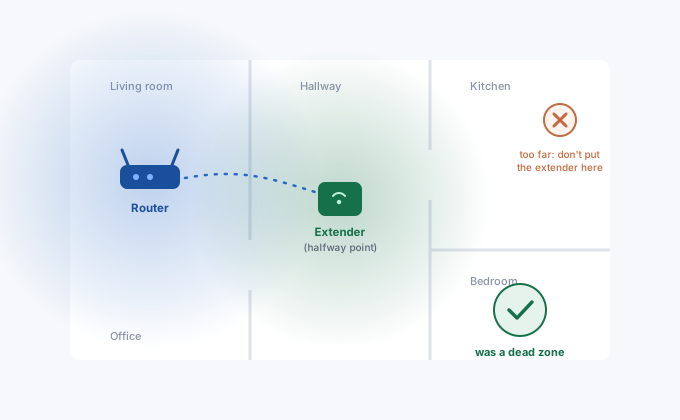
"Slow Wi-Fi" is three different diseases wearing one name, and the ten-minute diagnosis saves hours of random fixes. Test wired at the router, test Wi-Fi next to the router, test Wi-Fi in the bad room. If wired is slow, it's the line or ISP, no Wi-Fi setting will help and the ISP-evidence guide is your path. If wired is fine but Wi-Fi is slow even beside the router, it's the router itself, config, overload, or age. If it's only slow in certain rooms, it's coverage, and the fixes are placement, an extender or mesh, not channel fiddling.
One more axis people miss: slow for everyone, or slow for one device? A single ancient laptop with Wi-Fi 4 will report miserable speeds on a network that's objectively fine, and one device saturating the line (backups, torrents, a stuck cloud sync) makes everything else feel broken. The router's client list with per-device traffic, where available, answers this in one glance.
The 2.4 GHz Slum and Other Radio Realities
If your devices sit on 2.4 GHz in an apartment building, slowness is close to guaranteed: twenty networks share three usable channels (1, 6, 11), plus microwaves, baby monitors and Bluetooth all shouting over each other. The band exists for range and old gadgets, not speed. The fix is usually making sure the fast devices use 5 GHz, either by band steering doing its job or by splitting the SSIDs so you can choose, and saving 2.4 GHz for the doorbell and the far corners.
Channel-wise: on 2.4 GHz pick 1, 6 or 11 (anything else overlaps two neighbours at once and makes it worse); on 5 GHz auto is usually fine, though enabling DFS channels can find genuinely empty air in dense buildings, with the minor quirk of occasional radar-triggered channel hops near airports. And the anticlimactic fix that outperforms all of this embarrassingly often: reboot the router, and if it's older than seven or eight years, accept that it may simply be done, standards moved on and so did your device count.