Router Login by Brand
Every major router brand uses a different default IP and login address. Find yours below and go directly to the login guide for your specific router.
Login Guides by Brand
- Netgear Login at routerlogin.net or 192.168.1.1. Default: admin / password.
- TP-Link Login at tplinkwifi.net or 192.168.1.1. Default: admin / admin (or set on first login).
- Linksys Login at myrouter.local or 192.168.1.1. Default: admin / admin.
- D-Link Login at dlinkrouter.local or 192.168.0.1. Default: admin / blank.
- Asus Login at router.asus.com or 192.168.1.1. Default: admin / admin.
- Arris (Comcast) Login at 10.0.0.1. Default: admin / password. XB6/XB7/XB8 require Xfinity App first.
- Google Nest No web panel. Managed via Google Home app only.
- MSI Login at 192.168.1.1. Default: admin / admin.
The Login Process Is the Same Everywhere
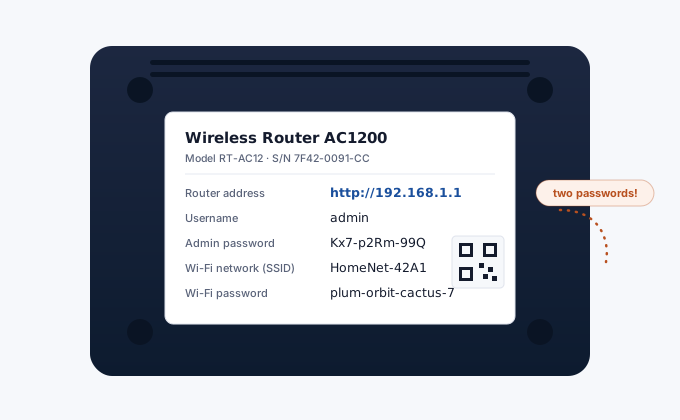
Brands love their own hostnames and colors, but under the hood every router login works identically. You connect to the router's network, you open its address in a browser, you type two credentials. That's the whole thing.
Where people actually get stuck is almost always one of these three spots:
Wrong network. You must be connected to the router you're trying to manage, over Wi-Fi or a cable. If your phone is on mobile data, 192.168.1.1 leads nowhere, the address only exists inside the local network. Same story if you're on a VPN, it routes local addresses away. Turn it off for a minute.
Wrong address. A Netgear guide won't help if your actual router is the ISP's box. Check the sticker on the device first, the admin URL is printed there on nearly every unit made after 2015 or so. No sticker info? Our detection tool reads the gateway from your device directly.
Wrong credentials. The password on the sticker is the router's own admin password, not your Wi-Fi password. Those are two different things, and mixing them up is probably the single most common login failure we hear about. If someone changed the admin password years ago and nobody remembers it, there's no way around a factory reset.
ISP Routers Play by Different Rules
If your router came from Comcast, BT, Vodafone or another provider, expect some differences. ISPs increasingly ship boxes with unique per-device passwords (printed on the label) instead of admin/admin, which is genuinely better for security. Some go further and lock parts of the panel entirely: Xfinity's XB series won't even let you log in from a browser until you've activated the gateway in their app, and certain settings like DNS can only be changed through the ISP's own tools.
That's not your router being broken. It's policy. When a setting seems missing, check whether your provider handles it in their app before assuming the hardware can't do it, and if you want full control the usual escape hatch is bridge mode with your own router behind the ISP box.
Login by IP Address
| IP Address | Main Brands | Guide |
|---|---|---|
192.168.1.1 | Linksys, TP-Link, Asus, Cisco | Login Guide |
192.168.0.1 | D-Link, Netgear, Spectrum | Login Guide |
10.0.0.1 | Comcast/Xfinity, Arris | Login Guide |
192.168.1.254 | BT Hub, Belkin, SpeedTouch | Login Guide |
192.168.100.1 | Arris SB8200, Motorola MB8600 | Login Guide |
192.168.2.1 | Belkin F5D, AT&T 2Wire | Login Guide |
10.0.1.1 | Apple AirPort | Login Guide |
192.168.10.1 | Ubee, CenturyLink, MSI | Login Guide |
Not sure which IP your router uses? Run ipconfig on Windows or check our Router IP detection tool.